
Checking a downloaded file
You are looking at an old version of this page: revision #1091 by zoobc.how, 2026-10-27 00:42 UTC. See the current version
A fake wallet can look and behave exactly like the real one until the moment it sends your recovery phrase somewhere else. So check the file itself, not the website you got it from. ZooBC records the fingerprints of its releases on the chain, and anyone can compare a file's fingerprint with them, in a browser or from a terminal.
Fingerprints on the chain
The fingerprint is the file's SHA-256 hash. Change a single byte of the file and the hash changes completely, so a matching hash means the very same file.
The chain holds hashes in two places:
- The release registry. The release authority, an account named in the chain's genesis, registers each release with its version string and a 32-byte manifest hash, and may later revoke it. Single files are listed too: the wallet, the explorer and the address files each have their own hash, and a bundle's entry is the SHA-256 of its SHA256SUMS file. Two thirds of the registered seats can also veto a release, and replace the authority after a week of votes (releases and updates).
- Transaction messages. Any transaction can carry a hash in its message, and the hash can be searched for.
Because these records are part of the chain, every node gives the same answer about them.
The /verify page
Every gateway serves a page at /verify. Drop a file on it and the page:
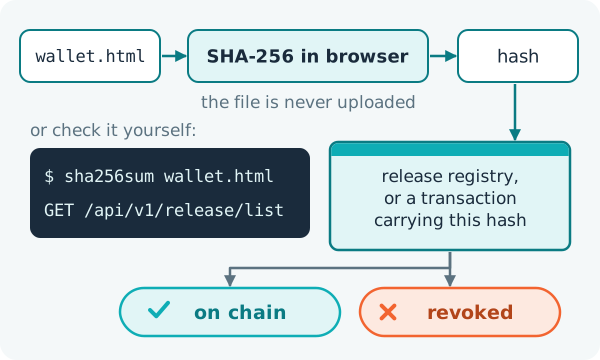
- computes the SHA-256 hash inside your browser; the file is never uploaded;
- looks the hash up in the release list (
/api/v1/release/list) and in transaction messages (/api/v1/search/transactions?q=followed by the hash); - reports one of three statuses: on-chain when the hash is registered on the chain; anchor pending when the file is meant to have chain backing but its hash is not registered, so only the gateway vouches for it; revoked when the release authority has withdrawn it.
When it loads, the page also reads the current release authority (/api/v1/release/authority) and warns you when a change of authority is pending. A revoked file is one that was withdrawn; delete it.
Without the website
You do not even have to trust the page. Compute the hash yourself and ask any node, including one you run yourself, for the release list:
sha256sum wallet.html
GET /api/v1/release/list
If the hash you computed is listed for a release that has not been revoked, you hold the released file. For a bundle, check the hash of its SHA256SUMS file against the list, then run sha256sum -c SHA256SUMS beside the bundle's files. Every node answers from the same chain, so no single website has to be trusted.
What the gateway publishes
Each gateway publishes a verify manifest with the hash of the wallet file and the hash of its zip archive. The zip is built reproducibly: the same files always give the same archive, and so the same hash, which lets anyone rebuild it and compare.
What proves nothing
- A padlock (HTTPS) proves only which website you reached, not what the file does.
- The file size is easy to copy.
- A balance that looks right says nothing about where your recovery phrase goes next.
Only the hash, compared with the chain, tells you that the file is the one that was released.