
The web wallet
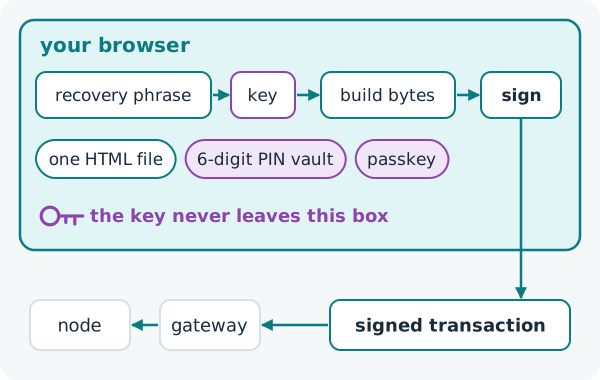
The official ZooBC wallet is a single HTML file that runs in a web browser. It builds and signs every transaction on your device and sends only the signed bytes to the network, so no server, gateway or node ever receives your key. There is nothing to install and no account to open with anyone. For first steps, see getting a wallet and keeping it safe; this page explains how the wallet works.
Where it comes from
Every node serves the wallet at / and at /wallet, and the public gateways serve the same page on their own domains. You can also keep a copy of the file and open it from your own disk. Because a fake wallet can look exactly like the real one, check a downloaded copy before you type a recovery phrase into it (checking a downloaded file).
Keys and the vault
A wallet starts from a recovery phrase: BIP-39 words, 12 to 24 of them, with 24 recommended. The keys are derived from it with SLIP-0010 Ed25519 along the path m/44'/883'/n', where 883 is ZooBC's coin type (keys and account types). The phrase is the only backup. Nobody keeps a copy, the ZooBC Foundation included, so a lost phrase cannot be restored by anyone.
On your device the wallet keeps an encrypted vault, unlocked with a 6-digit PIN or a passphrase. It can also unlock with a passkey, such as a fingerprint or face unlock. After a wrong PIN the wallet makes you wait before the next try; erasing the vault after failed attempts is an option you can switch on.
Watch-only accounts ("Watch an address") show the balance and activity of any address without holding its key.
Signing in the page
The wallet builds each transaction's bytes, signs the chain-bound digest with your key (signing a transaction) and posts the signed transaction to a node. A signed transaction cannot be changed without breaking its signature, so a gateway or node that carries it can pass it on or drop it, but never alter it or sign anything in your name.
Many account formats
One wallet holds accounts in many formats: native ZooBC accounts (ZBC_…), Ethereum and BNB (the same 0x… scheme), Bitcoin (SegWit bc1q…, legacy 1… and Taproot bc1p…), Solana, Polkadot, Cardano, Ripple, Tron and Tezos. Each signs with its home chain's own scheme, and each is a separate account on ZooBC's ledger (keys and account types).
The wallet can also ask MetaMask to sign a consent that links an Ethereum address into an account group (MetaMask and Ethereum-style access).
Air-gap mode
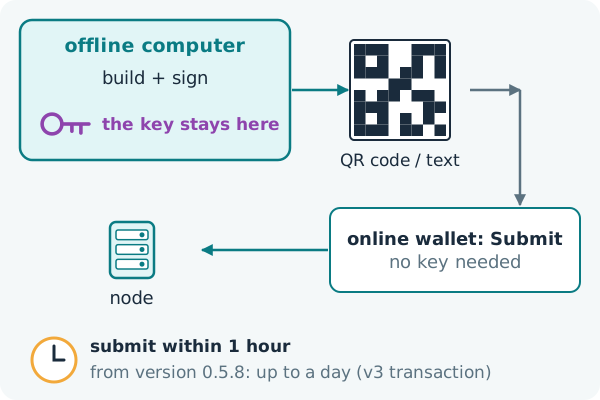
Signing and broadcasting are separate steps, and the wallet can keep them apart. In air-gap mode it runs on a computer that never goes online. It builds and signs each transaction there, but instead of sending it, shows the signed transaction as text and as a QR code. You carry that to any online copy of the wallet and paste or scan it on the Submit page, which needs no key at all. The key never touches a connected machine.
Submit soon after signing. A transaction carries its own timestamp, and a block may include it only within a window after that time: one hour by default, or, for a version-3 transaction, a window it states itself, of up to a day (expiry and timestamps).
Staying connected
The wallet reaches the chain through a gateway. When its gateway fails, it re-reads the on-chain lists of gateways, relays and archival services and moves to another one. Calls between accounts, online presence and the moves of channel games pass through a relay. When a newer node release is registered on the chain, the wallet shows a banner, and a node's owner can set the node's update switch from the wallet without logging in to the server (releases and updates).